RTC 驱动示例说明
中文 | English
简介
本示例展示如何在 Titan Board Mini 上使用 RT-Thread RTC 设备驱动框架 来驱动 RA8P1 微控制器的实时时钟外设。RTC (Real-Time Clock) 是一个重要的硬件外设,能够在主电源断开时继续保持时间信息,为系统提供可靠的时间基准。
主要功能
RA8P1 RTC 硬件初始化
日期和时间设置与读取
闹钟功能配置
电池备份支持
LED 指示灯状态显示
硬件介绍 - RA8P1 RTC 特性
1. 概述
RA8P1 是瑞萨电子推出的高性能微控制器,集成了多个先进的外设。其 RTC 模块是一个完整的实时时钟系统,具备完整的日历功能和低功耗特性。
2. RA8P1 RTC 主要特性
2.1 核心功能
日历功能: 支持年份、月份、日期、小时、分钟、秒的完整时间计算
时钟源: 32.768kHz 晶振作为时钟源,提供精准的时间基准
低功耗运行: 支持低功耗模式,可在电池供电下长时间运行
电池备份: 支持 VBATT 电池备份功能,主电源断开后仍能保持时间信息
2.2 闹钟功能
可编程闹钟: 支持设置多个闹钟事件
多种触发方式:
每秒触发
每分钟触发
每小时触发
每日触发
每周触发
每月触发
每年触发
2.3 高级特性
闰年自动补偿: 自动处理闰年计算
2000-2099 日历: 支持 100 年日历范围 (2000-2099)
温度补偿: 可选温度补偿功能提高时间精度
事件链接控制器: 支持与外设的事件链接触发
2.4 硬件支持
VBATT 引脚: 专门的电池备份引脚,支持外部电池供电
32.768kHz 晶振: 内置副时钟振荡器
备份寄存器: 提供数据备份功能
篡改检测: 支持最多 3 个篡改检测引脚
2.5 电源管理
多种电源模式:
正常模式
低功耗模式
深度睡眠模式
电压检测: 可编程电压检测 (PVD) 功能
看门狗: 双路看门狗定时器
3. RA8P1 RTC 技术参数
参数 |
值 |
描述 |
|---|---|---|
时钟精度 |
±5ppm |
32.768kHz 晶振精度 |
日历范围 |
2000-2099 |
支持 100 年日历 |
时间格式 |
24小时制 |
支持小时:分钟:秒 |
闰年处理 |
自动 |
自动计算闰年 |
工作电压 |
1.62-3.6V |
宽电压范围 |
温度范围 |
-40°C ~ +105°C |
工业级温度范围 |
备份电源 |
3.3V |
支持 VBATT 电池备份 |
软件架构 - RT-Thread RTC 设备框架
1. RT-Thread 设备架构
RT-Thread 采用分层的设备管理架构:
应用层
├── I/O 设备管理层
├── 设备驱动框架层
└── 设备驱动层
    └── RA8P1 RTC 硬件抽象层
2. RTC 设备类型
在 RT-Thread 中,RTC 属于设备类型 RT_Device_Class_RTC:
enum rt_device_class_type {
    RT_Device_Class_Char,    // 字符设备
    RT_Device_Class_Block,   // 块设备
    RT_Device_Class_NetIf,   // 网络接口设备
    RT_Device_Class_MTD,     // 内存设备
    RT_Device_Class_RTC,     // RTC 设备
    RT_Device_Class_Sound,   // 声音设备
    RT_Device_Class_Graphic, // 图形设备
    // ...
};
3. 设备管理接口
3.1 设备查找
rt_device_t rt_device_find(const char* name);
3.2 设备操作
rt_err_t rt_device_open(rt_device_t dev, rt_uint16_t oflag);
rt_err_t rt_device_close(rt_device_t dev);
rt_size_t rt_device_read(rt_device_t dev, rt_off_t pos, void *buffer, rt_size_t size);
rt_size_t rt_device_write(rt_device_t dev, rt_off_t pos, const void *buffer, rt_size_t size);
rt_err_t rt_device_control(rt_device_t dev, rt_uint8_t cmd, void *arg);
4. RT-Thread RTC API
4.1 时间操作 API
// 设置日期
rt_err_t set_date(rt_uint32_t year, rt_uint32_t month, rt_uint32_t day);

// 设置时间
rt_err_t set_time(rt_uint32_t hour, rt_uint32_t minute, rt_uint32_t second);

// 获取当前时间
time_t time(time_t *t);
4.2 时间戳操作
// 获取时间戳
time_t get_timestamp(time_t *timestamp);

// 时间戳转换为本地时间
void gmtime_r(const time_t *timep, struct tm *result);
4.3 闹钟 API
// 闹钟回调函数
typedef void (*rt_alarm_callback)(rt_alarm_t alarm, time_t timestamp);

// 创建闹钟
rt_alarm_t rt_alarm_create(rt_alarm_callback callback, struct rt_alarm_setup *setup);

// 启动闹钟
rt_err_t rt_alarm_start(rt_alarm_t alarm);

// 停止闹钟
rt_err_t rt_alarm_stop(rt_alarm_t alarm);

// 删除闹钟
rt_err_t rt_alarm_delete(rt_alarm_t alarm);
使用示例
1. 时间设置与读取
1.1 基础时间设置
#include <rtthread.h>
#include <rtdevice.h>

void hal_entry(void)
{
    rt_err_t ret = RT_EOK;
    time_t now;
    rt_device_t device = rt_device_find("rtc");

    if (!device) {
        rt_kprintf("查找 RTC 设备失败!\n");
        return;
    }

    // 打开设备
    ret = rt_device_open(device, 0);
    if (ret != RT_EOK) {
        rt_kprintf("打开 RTC 设备失败!\n");
        return;
    }

    // 设置日期 (2025年8月1日)
    ret = set_date(2025, 8, 1);
    if (ret != RT_EOK) {
        rt_kprintf("设置 RTC 日期失败\n");
        return;
    }
    rt_kprintf("设置 RTC 日期为 2025-8-1\n");

    // 设置时间 (15:00:00)
    ret = set_time(15, 00, 00);
    if (ret != RT_EOK) {
        rt_kprintf("设置 RTC 时间失败\n");
        return;
    }
    rt_kprintf("设置 RTC 时间为 15:00:00\n");

    // 延时3秒
    rt_thread_mdelay(3000);

    // 获取当前时间戳
    get_timestamp(&now);
    rt_kprintf("当前时间: %.*s", 25, ctime(&now));
}
1.2 高级时间操作
// 获取完整时间信息
void get_full_time_info(void)
{
    time_t now;
    struct tm *timeinfo;

    // 获取当前时间戳
    now = time(NULL);

    // 转换为本地时间
    timeinfo = localtime(&now);

    rt_kprintf("当前时间信息:\n");
    rt_kprintf("年份: %d\n", timeinfo->tm_year + 1900);
    rt_kprintf("月份: %d\n", timeinfo->tm_mon + 1);
    rt_kprintf("日期: %d\n", timeinfo->tm_mday);
    rt_kprintf("小时: %d\n", timeinfo->tm_hour);
    rt_kprintf("分钟: %d\n", timeinfo->tm_min);
    rt_kprintf("秒: %d\n", timeinfo->tm_sec);
    rt_kprintf("星期几: %d\n", timeinfo->tm_wday);
    rt_kprintf("一年中的第几天: %d\n", timeinfo->tm_yday);
    rt_kprintf("夏令时标志: %d\n", timeinfo->tm_isdst);
}
2. 闹钟配置
2.1 闹钟回调函数
void user_alarm_callback(rt_alarm_t alarm, time_t timestamp)
{
rt_kprintf("闹钟触发! 时间: %.*s", 25, ctime(×tamp));
struct rt_alarm_setup *setup = (struct rt_alarm_setup *)alarm->user_data;
if (setup->flag == RT_ALARM_SECOND) {
rt_kprintf("每秒闹钟触发\n");
} else if (setup->flag == RT_ALARM_MINUTE) {
rt_kprintf("每分钟闹钟触发\n");
}
}
2.2 闹钟示例配置
// 闹钟示例函数
void alarm_sample(void)
{
    rt_device_t dev = rt_device_find("rtc");
    struct rt_alarm_setup setup;
    struct rt_alarm *alarm = RT_NULL;
    static time_t now;
    struct tm p_tm;

    // 获取当前时间戳
    now = get_timestamp(NULL);

    // 设置闹钟时间为下一秒
    now += 1;
    gmtime_r(&now, &p_tm);

    // 配置闹钟参数
    setup.flag = RT_ALARM_SECOND;  // 每秒触发
    setup.wktime.tm_year = p_tm.tm_year;
    setup.wktime.tm_mon = p_tm.tm_mon;
    setup.wktime.tm_mday = p_tm.tm_mday;
    setup.wktime.tm_wday = p_tm.tm_wday;
    setup.wktime.tm_hour = p_tm.tm_hour;
    setup.wktime.tm_min = p_tm.tm_min;
    setup.wktime.tm_sec = p_tm.tm_sec;

    // 创建闹钟
    alarm = rt_alarm_create(user_alarm_callback, &setup);
    if (alarm != RT_NULL) {
        rt_alarm_start(alarm);
        rt_kprintf("闹钟创建并启动成功\n");
    }
}
配置说明
运行效果示例
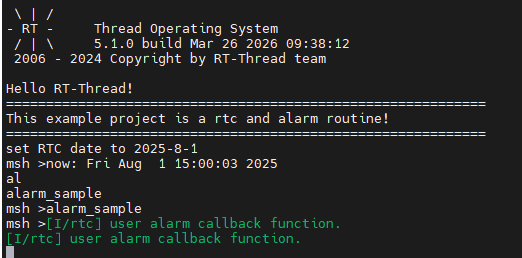
1. 控制台输出
将程序编译烧写进去后,上电在终端运行alarm_sample即可看到效果