Ethernet Example Guide

Chinese | English

Introduction

This example demonstrates how to use the Ethernet interface on Titan Board Mini, combined with the RT-Thread Ethernet driver framework to implement network communication functions.

Key features include:

  • Initialize RA8 series Ethernet hardware

  • Configure IP address, subnet mask, and gateway

  • Send and receive Ethernet frames

  • Integrate RT-Thread netdev framework for unified network device management

  • Support DMA and interrupts for high-speed data transfer

Ethernet Overview

1. General Introduction

Ethernet is the most widely used Local Area Network (LAN) technology, proposed by Xerox PARC in the 1970s and later standardized by IEEE 802.3. Ethernet has the following characteristics:

  • Data transmission method: Frame-based packet switching, physically transmitted through twisted pair, fiber optic, or wireless media.

  • Topology: Traditional Ethernet used bus or star topology, while modern Ethernet mainly adopts star and tree topologies.

  • Protocol layer: Belongs to the data link layer (Layer 2) and physical layer (Layer 1) technologies of the OSI model.

2. Ethernet Frame Structure

Ethernet uses frames as the unit of data transmission. An Ethernet frame consists of the following fields:

Field

Length

Description

Preamble

7 bytes

Used for frame synchronization

Start Frame Delimiter (SFD)

1 byte

Frame start marker, value is 10101011

Destination MAC Address

6 bytes

Receiver hardware address

Source MAC Address

6 bytes

Transmitter hardware address

Type/Length

2 bytes

Upper layer protocol type or frame length

Data Payload

46~1500 bytes

Upper layer data (e.g., IP packet)

CRC Checksum

4 bytes

Cyclic redundancy check for frame integrity

Minimum frame length: 64 bytes Maximum frame length: 1518 bytes (without VLAN tag)

RA8 Series Ethernet Features

RA8 series MCUs (such as RA8P1) integrate high-performance Ethernet MAC, supporting RGMII, RMII, and MII interfaces, providing stable and reliable high-speed network communication capabilities. The MAC can work with external PHY and is compatible with the LwIP TCP/IP protocol stack.

1. Network Interface Features

  1. Interface Types

    • RMII (Reduced Media Independent Interface): Pin-saving, supports 10/100 Mbps

    • MII (Media Independent Interface): Standard interface, supports 10/100 Mbps

    • RGMII (Reduced Gigabit MII): Supports 10/100/1000 Mbps, high-speed interface for Gigabit Ethernet

  2. PHY Connection

    • External PHY connected via MDC/MDIO interface

    • Supports auto-negotiation of speed and duplex mode

    • Can read and write PHY registers for configuration and status monitoring

2. MAC Features

  1. Duplex and Speed Support

    • Full/half duplex

    • Supports 10/100/1000 Mbps (RGMII)

    • Supports auto-negotiation or forced configuration

  2. Frame Processing

    • VLAN tag support (IEEE 802.1Q, optional)

    • Supports multicast and broadcast frame filtering

    • Hardware CRC generation and verification

  3. MAC Address Management

    • Supports single or multiple MAC addresses

    • Can be dynamically configured via FSP or software

3. DMA and Buffer Features

  1. Independent TX/RX DMA Engines

    • Supports simultaneous transmission and reception

    • Reduces CPU usage and improves throughput

  2. Descriptor Queues

    • Configurable number of TX/RX buffers

    • Supports chained DMA for efficient large data transfer

  3. Multi-buffer Management

    • Supports ring buffers for continuous transmission

    • Reduces packet loss

  4. Hardware Acceleration

    • Frame filtering, length check, and CRC verification

4. Interrupt Mechanism

  1. Interrupt Types

    • Receive complete (RX)

    • Transmit complete (TX)

    • Error interrupts (CRC error, buffer overflow)

  2. Interrupt Configuration

    • Priority configurable via FSP

    • Supports RT-Thread ISR integration

  3. Optimization

    • RX/TX interrupts can work with DMA

    • Selective interrupt enabling for improved performance

5. PHY Management

  1. MDIO Interface

    • Can read/write PHY registers for configuration, reset, and status monitoring

  2. Auto-negotiation

    • Supports speed (10/100/1000 Mbps) and duplex mode auto-negotiation

  3. Link Monitoring

    • Detect link status (Up/Down)

    • CRC error and collision detection

6. Protocol and Stack Support

  1. TCP/IP Protocol Stack Integration

    • Compatible with LwIP

    • Supports TCP/UDP/ICMP, DHCP client/server, ARP

  2. Application Layer Support

    • Supports Telnet, HTTP, MQTT and other applications

    • Multi-thread safe, supports concurrent access

7. Performance and Reliability

  1. Throughput Optimization

    • DMA + interrupts reduce CPU usage

    • Adjustable TX/RX buffer sizes

  2. Reliability Features

    • Hardware CRC checksum

    • VLAN and multicast filtering reduce interference

    • Link detection and auto-reconnection

FSP Configuration

Note: This project uses FSP version 6.4.0. Please use FSP 6.4.0 when configuring FSP features.

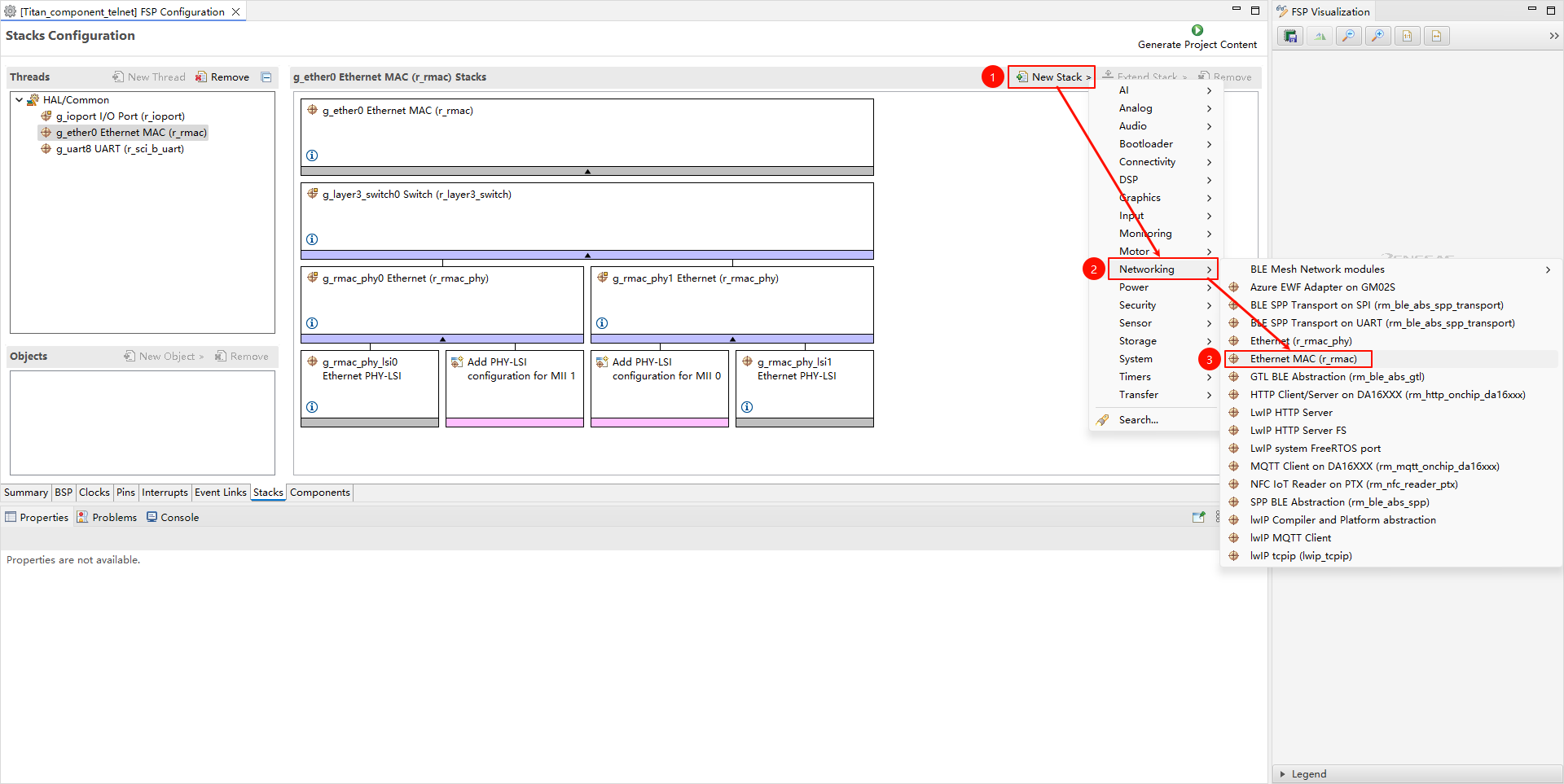
  • Create new r_rmac stack:

image-20250814131414903

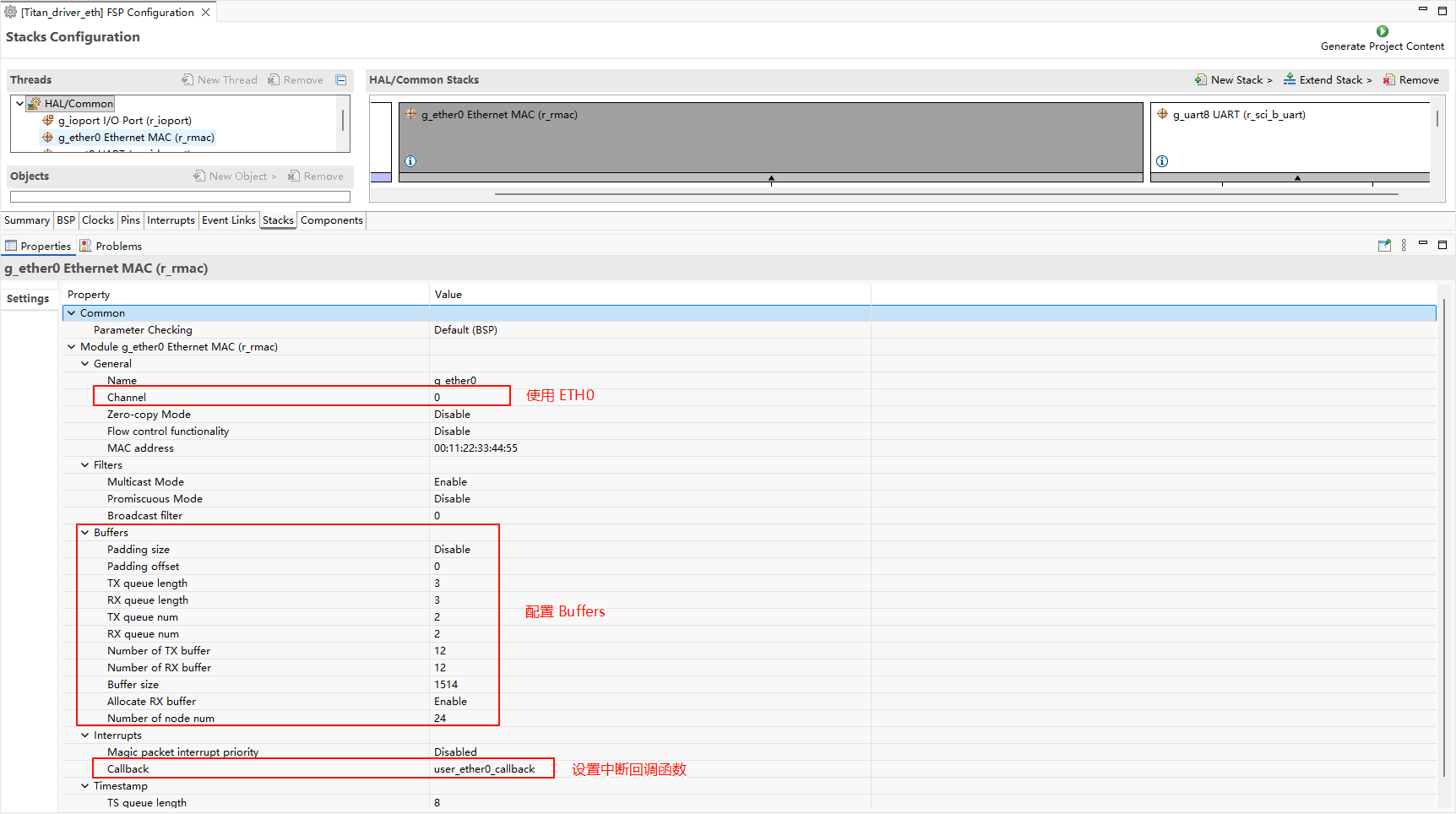
  • Configure r_mac stack:

image-20251031163125761

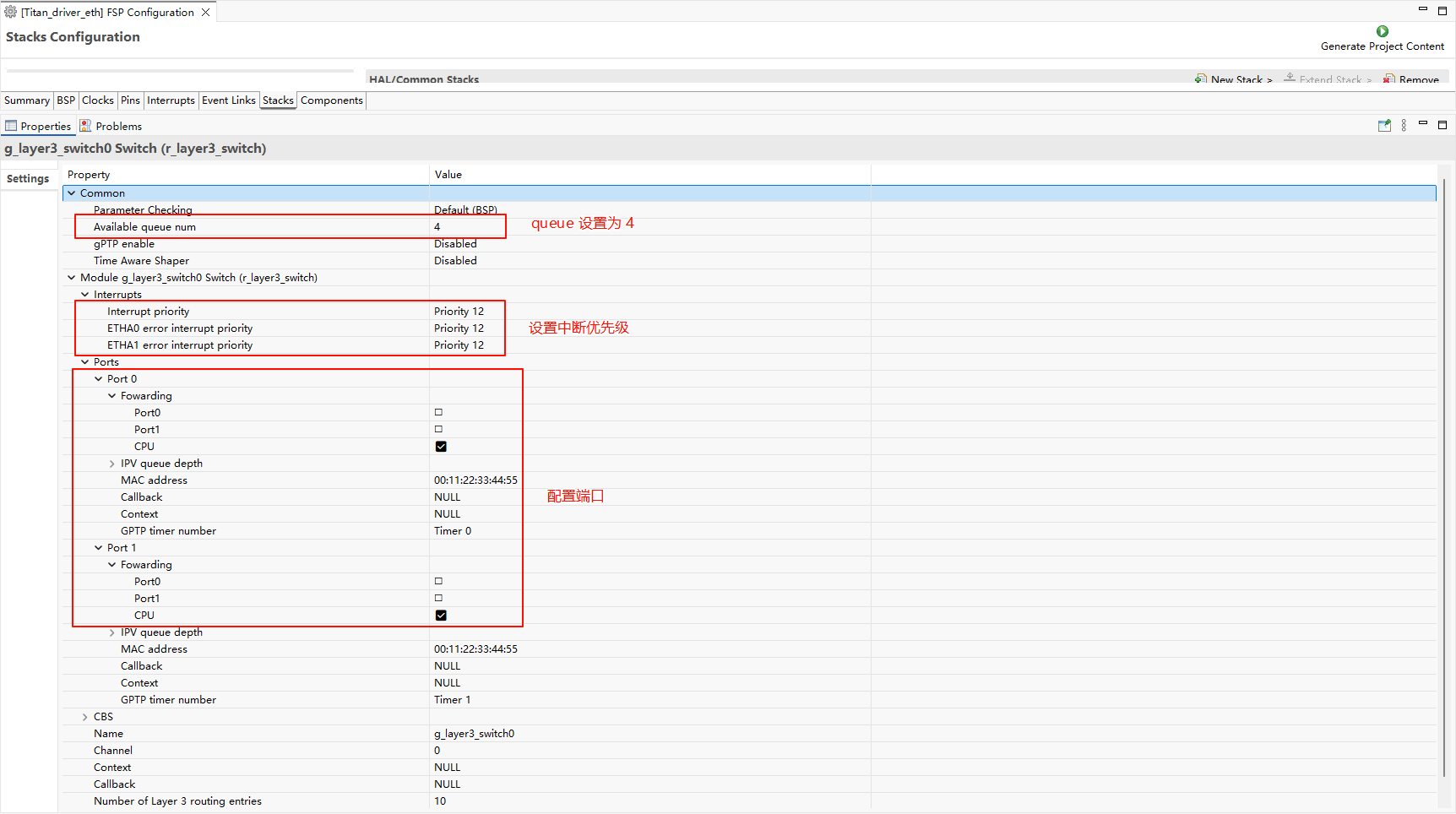
  • Configure r_layer3_switch:

image-20251031163345186

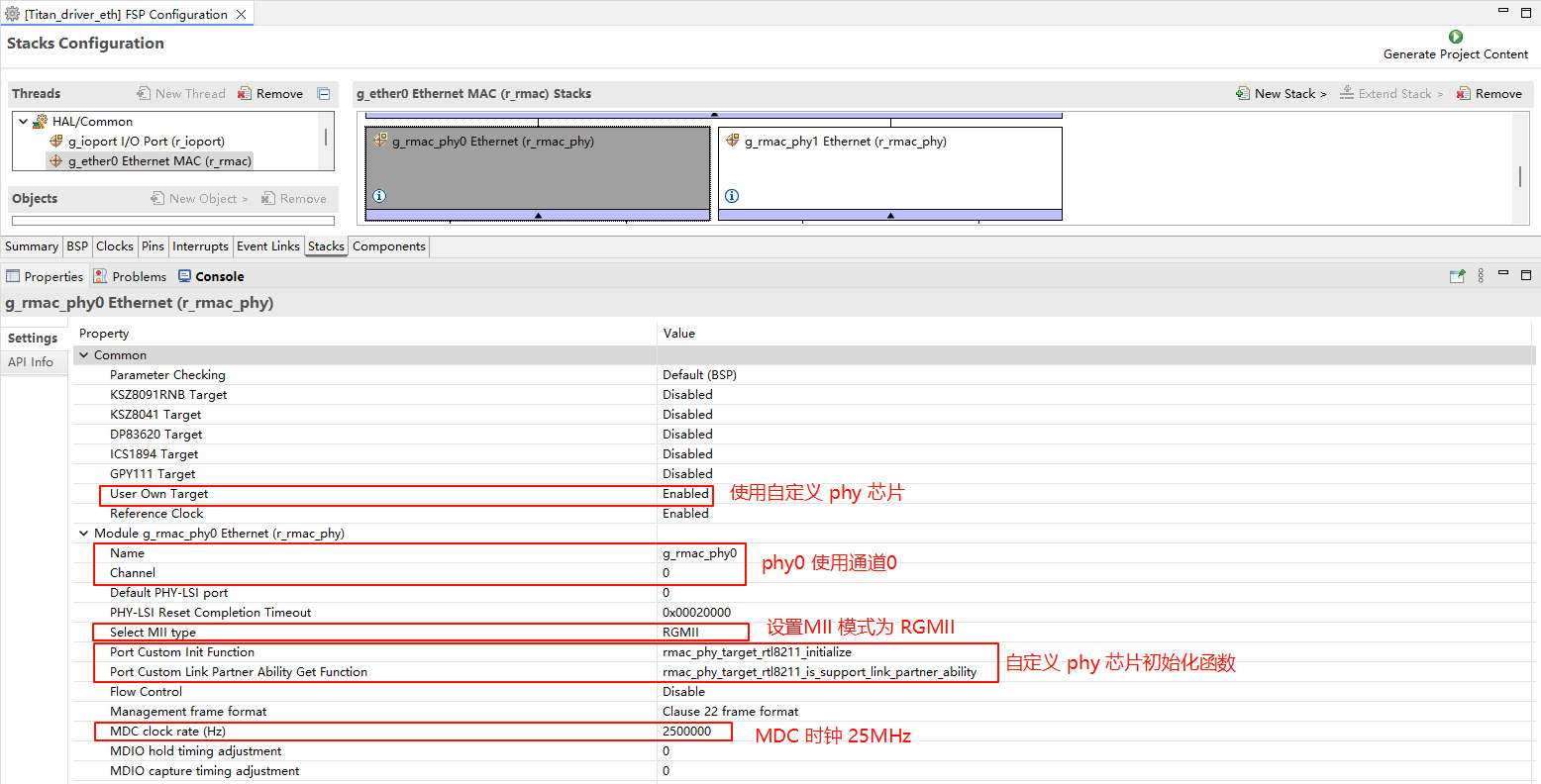
  • Configure r_rmac_phy:

image-20250814152410946

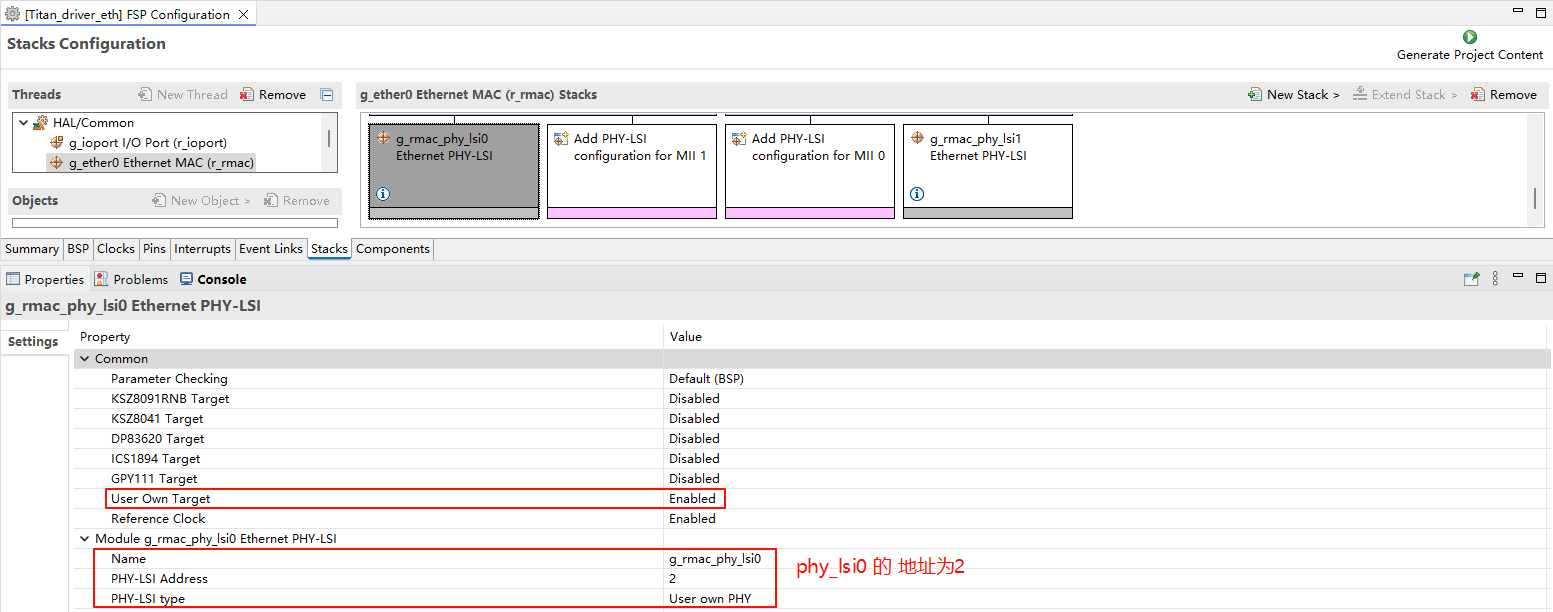
  • Configure g_rmac_phy_lsi0:

image-20250814152603736

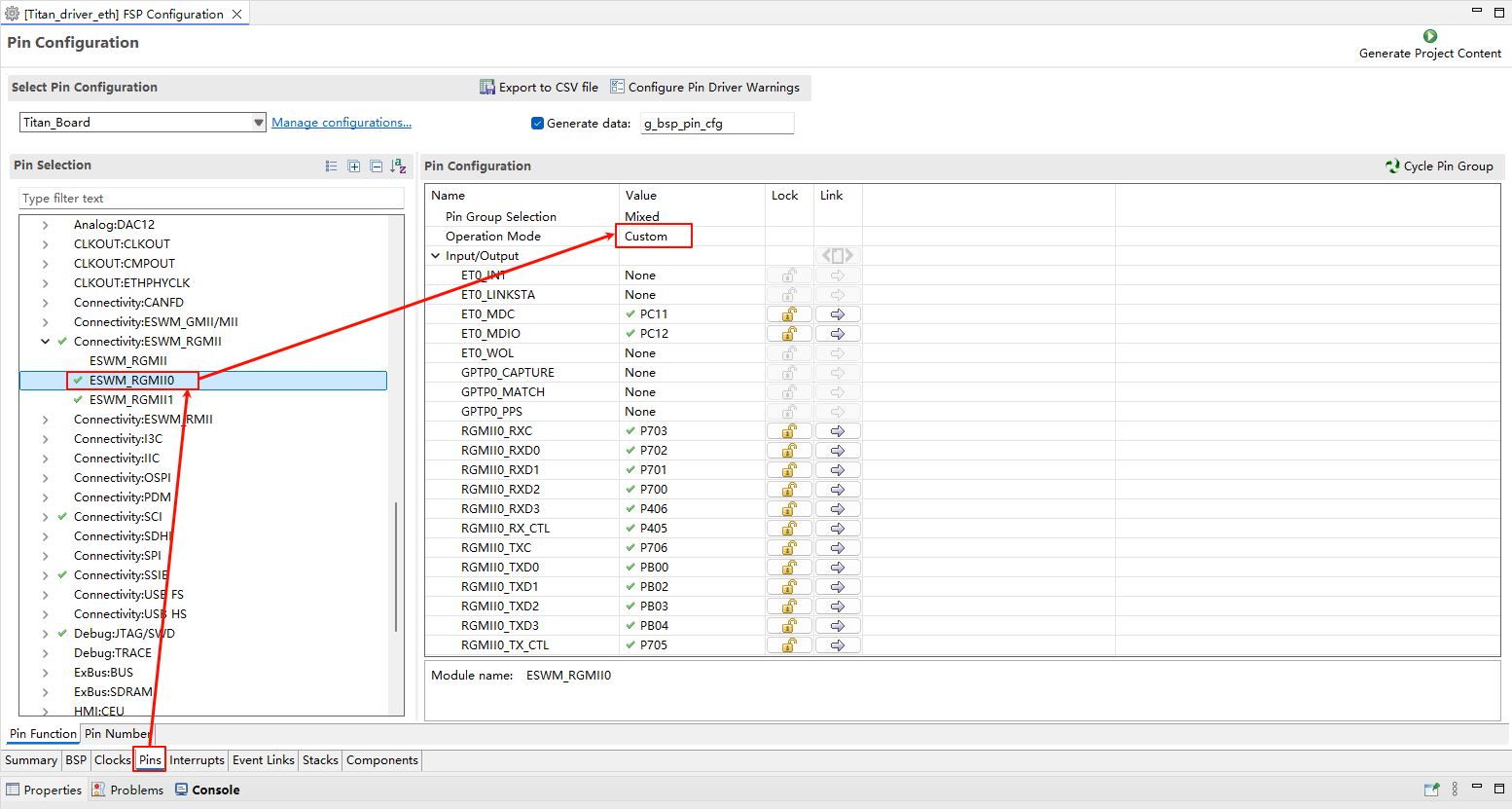
  • ETH0 pin configuration:

image-20250814152720113

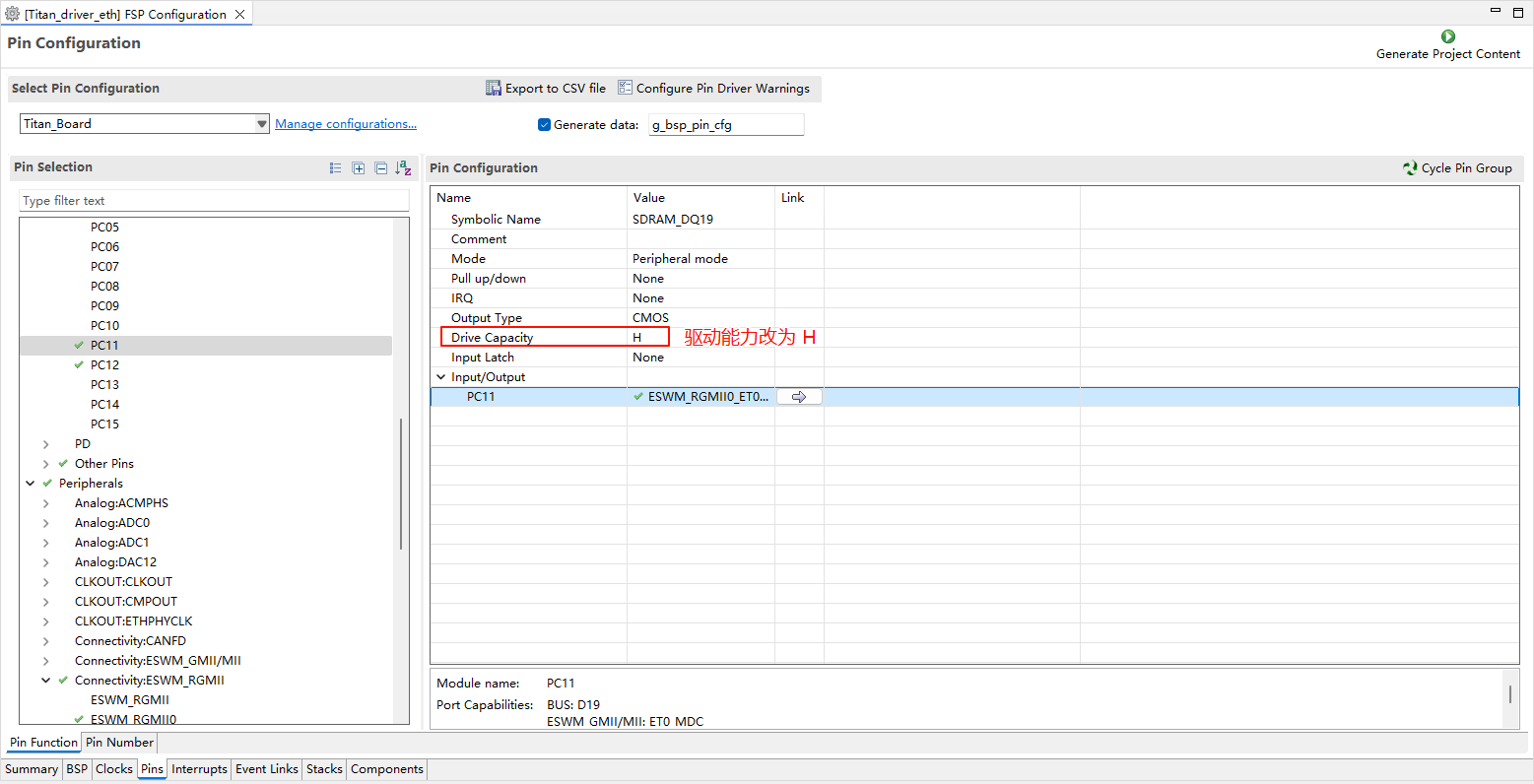
  • Note: All ETH-related pins need to have their drive strength changed to H.

image-20250814152759063

RT-Thread Settings Configuration

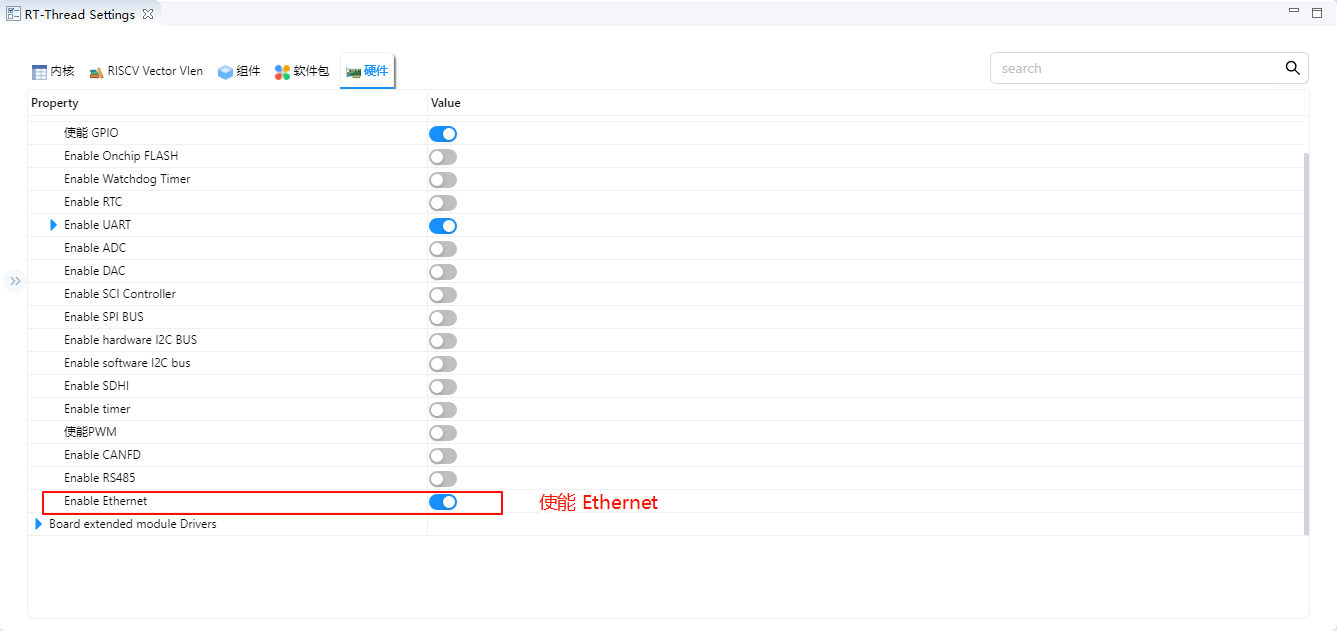
  • Enable Ethernet in RT-Thread Settings.

image-20250814133033609

Software Description

The Ethernet PHY chip initialization function is in ./board/ports/drv_rtl8211.c:

void rmac_phy_target_rtl8211_initialize (rmac_phy_instance_ctrl_t * phydev)
{
#define RTL_8211F_PAGE_SELECT 0x1F
#define RTL_8211F_EEELCR_ADDR 0x11
#define RTL_8211F_LED_PAGE 0xD04
#define RTL_8211F_LCR_ADDR 0x10

    uint32_t val1, val2 = 0;

    /* switch to led page */
    R_RMAC_PHY_Write(phydev, RTL_8211F_PAGE_SELECT, RTL_8211F_LED_PAGE);

    /* set led1(green) Link 10/100/1000M, and set led2(yellow) Link 10/100/1000M+Active */
    R_RMAC_PHY_Read(phydev, RTL_8211F_LCR_ADDR, &val1);
    val1 |= (1 << 5);
    val1 |= (1 << 8);
    val1 &= (~(1 << 9));
    val1 |= (1 << 10);
    val1 |= (1 << 11);
    R_RMAC_PHY_Write(phydev, RTL_8211F_LCR_ADDR, val1);

    /* set led1(green) EEE LED function disabled so it can keep on when linked */
    R_RMAC_PHY_Read(phydev, RTL_8211F_EEELCR_ADDR, &val2);
    val2 &= (~(1 << 2));
    R_RMAC_PHY_Write(phydev, RTL_8211F_EEELCR_ADDR, val2);

    /* switch back to page0 */
    R_RMAC_PHY_Write(phydev, RTL_8211F_PAGE_SELECT, 0xa42);
}

bool rmac_phy_target_rtl8211_is_support_link_partner_ability (rmac_phy_instance_ctrl_t * p_instance_ctrl,
                                                             uint32_t                   line_speed_duplex)
{
    FSP_PARAMETER_NOT_USED(p_instance_ctrl);
    FSP_PARAMETER_NOT_USED(line_speed_duplex);

    /* This PHY-LSI supports half and full duplex mode. */
    return true;
}

Build & Download

  • RT-Thread Studio: Download the Titan Board resource package from the package manager in RT-Thread Studio, then create a new project and build it.

After compilation is complete, connect the development board’s USB-DBG interface to the PC, then download the firmware to the development board.

Running Effect

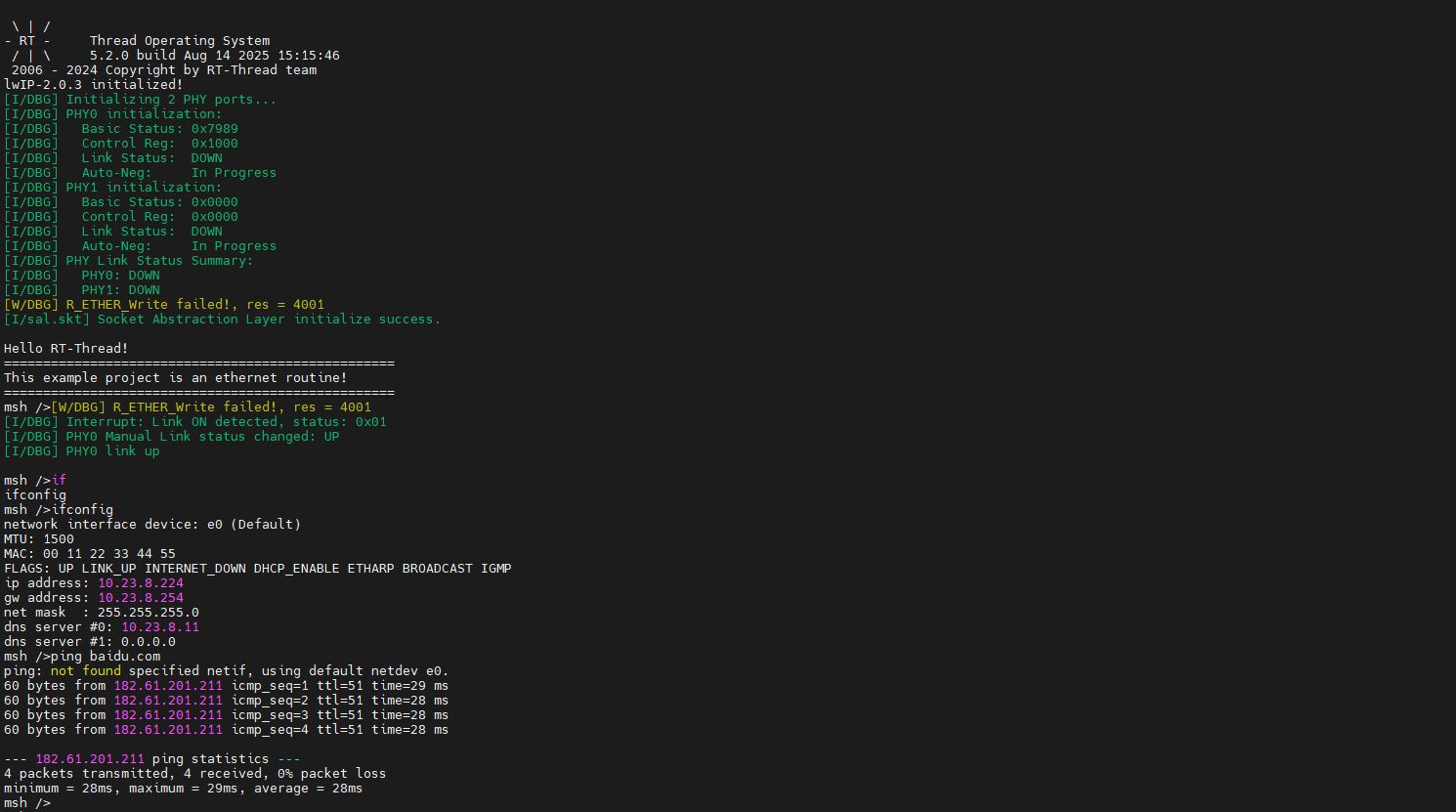
Insert the network cable into the Ethernet port, press the reset button to restart the development board. After waiting for PHY0 link up, enter ifconfig to view the IP address obtained by the development board, then enter ping baidu.com command for connectivity testing.

image-20250814153134610

iperf Test

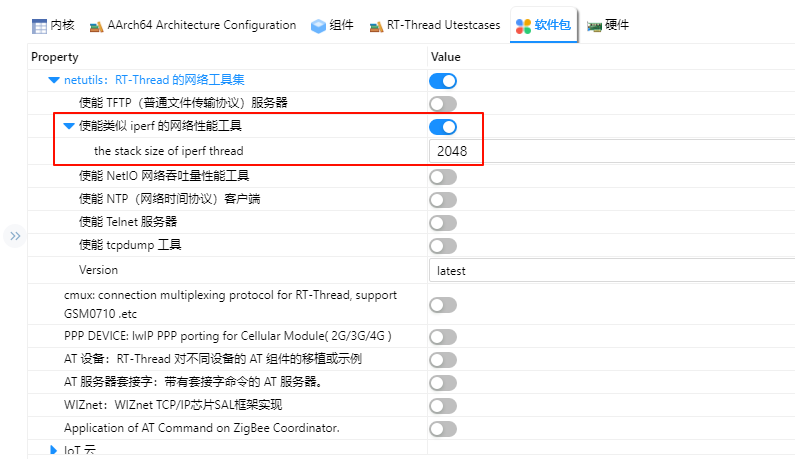
Open RT-Thread Settings, add the netutils package and enable the iperf tool.

image-20251110114623672

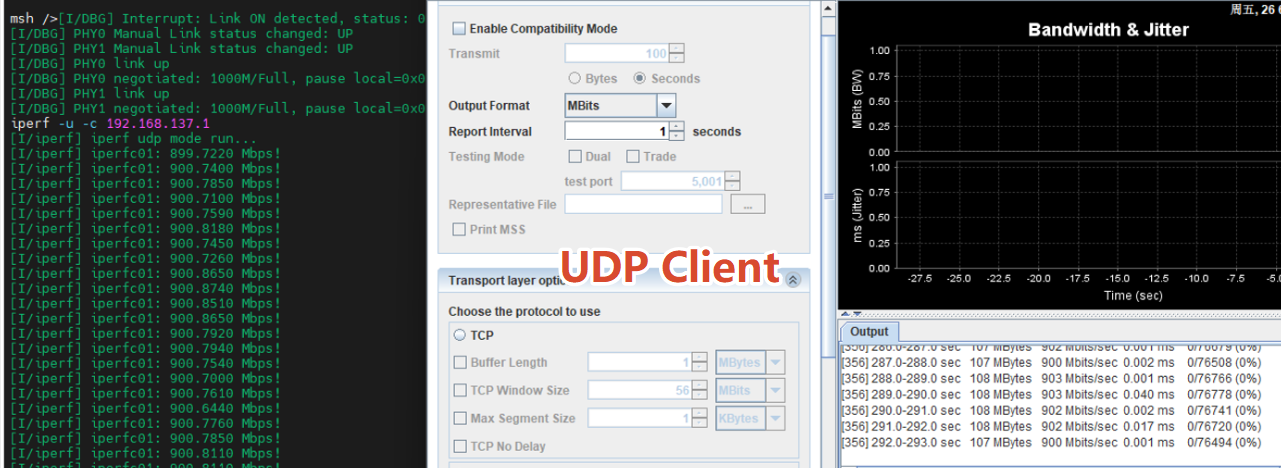
After compilation and download, enter iperf -c host_IP -p 5001 in the serial terminal for iperf testing.

image-20251110115000947