QSPI Flash 文件系统示例说明
中文 | English
简介
本示例展示了如何在 Titan Board Mini 上使用板载 QSPI Flash (W25Q64) 实现 LittleFS 文件系统,通过 RT-Thread 的 FAL (Flash Abstraction Layer) 抽象层进行 Flash 设备管理。
主要功能包括:
使用 QSPI 接口驱动 W25Q64 Flash (8MB 容量)
通过 FAL 抽象层管理 Flash 设备和分区
挂载 LittleFS 文件系统到 Flash 分区
提供标准的文件 I/O 操作接口
支持文件系统的读写、创建、删除等操作
硬件介绍
1. W25Q64 QSPI Flash
Titan Board Mini 板载一颗 W25Q64 QSPI Flash 芯片:
参数 |
说明 |
|---|---|
型号 |
W25Q64 |
容量 |
8MB (64Mbit) |
接口 |
QSPI (Quad SPI) |
工作电压 |
2.7V - 3.6V |
扇区大小 |
4KB |
块大小 |
64KB |
页大小 |
256B |
时钟频率 |
最高 133MHz (QSPI 模式) |
2. QSPI 接口特性
QSPI (Quad Serial Peripheral Interface) 是一种高速串行接口:
4 位数据线:相比标准 SPI,数据吞吐量提升 4 倍
高速传输:支持高达 133MHz 的时钟频率
低引脚数:仅需 6 个信号线(CLK、CS、D0-D3)
硬件加速:RA8P1 集成 OSPI_B 模块,支持 DMA 传输
软件架构
1. 分层设计
文件系统采用分层架构设计:
应用程序层 (用户代码)
    ↓
DFS (Device File System) - RT-Thread 文件系统抽象层
    ↓
LittleFS - 轻量级嵌入式文件系统
    ↓
FAL (Flash Abstraction Layer) - Flash 抽象层
    ↓
MTD (Memory Technology Device) - 内存设备驱动
    ↓
W25Q64 QSPI 驱动 - 硬件驱动层
    ↓
QSPI/OSPI_B 硬件接口
2. 核心组件
FAL (Flash Abstraction Layer)
FAL 提供 Flash 设备和分区的统一管理接口:
Flash 设备表:定义系统中的 Flash 设备
分区表:定义 Flash 分区布局
抽象接口:提供统一的读/写/擦除操作
FAL 配置 (fal_cfg.h):
/* Flash 设备表 */
#define FAL_FLASH_DEV_TABLE  \
{                             \
    &w25q64,                  \
}

/* 分区表 */
#define FAL_PART_TABLE  \
{                        \
    {FAL_PART_MAGIC_WORD, "bootloader", "W25Q64", 0,  512 * 1024, 0}, \
    {FAL_PART_MAGIC_WORD,        "app", "W25Q64", 512 * 1024,  512 * 1024, 0}, \
    {FAL_PART_MAGIC_WORD,   "download", "W25Q64", (512 + 512) * 1024, 1024 * 1024, 0}, \
    {FAL_PART_MAGIC_WORD, "filesystem", "W25Q64", (512 + 512 + 1024) * 1024, 1024 * 1024, 0}, \
}
LittleFS 文件系统
LittleFS 是专为嵌入式系统设计的文件系统:
断电安全:采用 Copy-on-Write 机制,保证数据完整性
磨损均衡:自动进行 Flash 磨损均衡,延长 Flash 寿命
低内存占用:RAM 占用小,适合资源受限的系统
动态大小:文件系统大小可根据需要调整
W25Q64 QSPI 驱动
W25Q64 驱动提供 Flash 硬件操作接口:
读操作:支持快速读取 (Quad Read)
写操作:页编程 (256B/page)
擦除操作:支持 4KB 扇区擦除和 64KB 块擦除
状态查询:查询 Flash 忙状态和写使能状态
3. 工程结构
Titan_Mini_component_flash_fs/
├── src/
│   └── hal_entry.c          # 主程序入口
├── libraries/
│   └── Common/ports/
│       ├── fal_cfg.h        # FAL 配置
│       └── w25q64/
│           ├── drv_w25q64.c # W25Q64 驱动
│           └── ospi_b_commands.c # QSPI 命令
└── packages/
    └── littlefs-v2.5.0/     # LittleFS 文件系统
        ├── lfs.c           # LittleFS 核心
        ├── lfs_util.c      # 工具函数
        └── dfs_lfs.c       # DFS 适配层
使用示例
1. 初始化流程
主程序 (src/hal_entry.c) 实现了完整的文件系统初始化流程:
#define FS_PARTITION_NAME   "filesystem"

void hal_entry(void)
{
    rt_kprintf("\n==================================================\n");
    rt_kprintf("Hello, Titan Board Mini!\n");
    rt_kprintf("==================================================\n");

    // 1. 初始化 FAL (Flash 抽象层)
    extern int fal_init(void);
    fal_init();

    // 2. 创建 MTD 设备
    extern struct rt_device* fal_mtd_nor_device_create(const char *parition_name);
    struct rt_device *mtd_dev = fal_mtd_nor_device_create(FS_PARTITION_NAME);

    if (mtd_dev == NULL)
    {
        rt_kprintf("Can't create a mtd device on '%s' partition.\n", FS_PARTITION_NAME);
    }
    else
    {
        rt_kprintf("Create a mtd device on the %s partition of flash successful.\n", FS_PARTITION_NAME);
    }

    // 主循环 - LED 闪烁
    while (1)
    {
        rt_pin_write(LED_PIN_R, PIN_HIGH);
        rt_thread_mdelay(500);
        rt_pin_write(LED_PIN_R, PIN_LOW);
        rt_thread_mdelay(500);
    }
}
2. 文件操作示例
文件系统初始化完成后,可以使用标准的 POSIX 文件 I/O 接口:
#include <dfs_file.h>

/* 写入文件示例 */
void write_file_example(void)
{
    FILE *fp = fopen("/filesystem/test.txt", "w");
    if (fp != NULL)
    {
        fprintf(fp, "Hello, Titan Board!\n");
        fprintf(fp, "This is a test file.\n");
        fclose(fp);
        rt_kprintf("File written successfully.\n");
    }
}

/* 读取文件示例 */
void read_file_example(void)
{
    char buffer[128];
    FILE *fp = fopen("/filesystem/test.txt", "r");
    if (fp != NULL)
    {
        while (fgets(buffer, sizeof(buffer), fp) != NULL)
        {
            rt_kprintf("%s", buffer);
        }
        fclose(fp);
    }
}

/* 列出文件示例 */
void list_files_example(void)
{
    DIR *dir = opendir("/filesystem");
    if (dir != NULL)
    {
        struct dirent *entry;
        while ((entry = readdir(dir)) != NULL)
        {
            rt_kprintf("File: %s\n", entry->d_name);
        }
        closedir(dir);
    }
}
运行效果
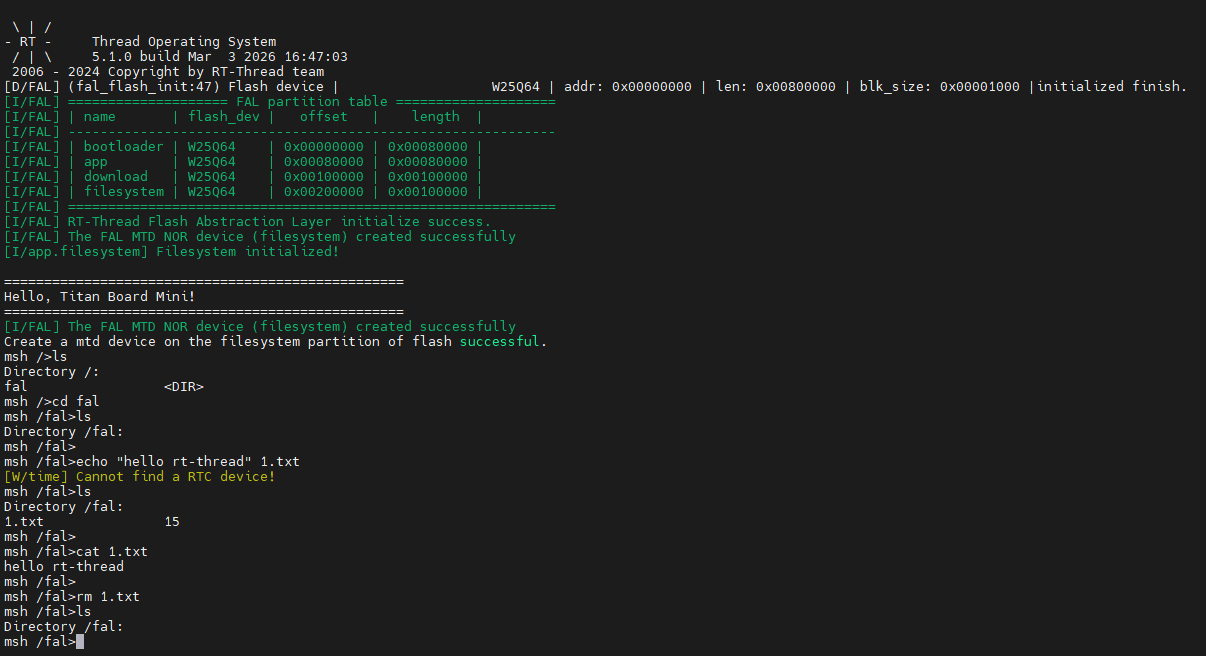
1. 终端输出
复位 Titan Board Mini 后终端会输出如下信息:
2. 文件系统测试
在 msh 命令行中可以测试文件系统:
msh >ls /filesystem
test.txt
config.ini
msh >cat /filesystem/test.txt
Hello, Titan Board!
This is a test file.
msh >
注意事项
1. Flash 使用限制
擦写次数:W25Q64 扇区擦写次数约 10万次
数据保持:常温下数据保持时间约 20年
写入前擦除:Flash 写入前必须先擦除
对齐要求:写入和擦除需要按扇区/页对齐
2. 文件系统建议
小文件优化:LittleFS 适合小文件频繁读写
断电保护:使用 LittleFS 的断电安全特性
定期备份:重要数据建议备份到其他存储介质
容量规划:预留一定空间用于磨损均衡
3. 性能优化
DMA 传输:使用 DMA 提高 QSPI 传输效率
缓存优化:合理配置文件系统缓存大小
批量操作:尽量批量读写,减少操作次数
错误处理:添加适当的错误处理和重试机制
扩展应用
基于本示例,可以扩展以下应用:
配置存储:存储系统配置参数
日志系统:实现循环日志记录
OTA 升级:存储新固件进行 OTA 升级
数据缓存:缓存传感器数据
资源存储:存储图片、音频、字体等资源文件
离线数据:存储离线数据库
固件备份:备份多份固件实现 A/B 升级