MIPI CSI Camera Example Guide

English|Chinese

Introduction

This example demonstrates how to use the MIPI CSI (Camera Serial Interface) on the Titan Board to connect an OV5640 camera, and display the captured images on an RGB565 LCD screen via the RT-Thread LCD framework.

Note: The current camera example can only be opened with the FSP 6.0.0 configuration tool.

Key functionalities include:

  • Initialize the MIPI CSI camera interface to capture real-time video streams

  • Configure OV5640 camera parameters (resolution, frame rate, output format)

  • Display captured images using the RT-Thread LCD driver

  • Support image format conversion (YUV422 → RGB565)

RA8 Series MIPI CSI Features

The RA8 series MCU integrates a MIPI CSI hardware module for high-speed, low-power camera data acquisition, suitable for HD video and real-time image processing.

1. Hardware Interface Features

  1. Interface Type

    • MIPI CSI-2 D-PHY interface for high-bandwidth serial data transmission

    • Supports 1–4 data lanes

    • Synchronization is handled by MIPI D-PHY; no additional HSYNC/VSYNC required

  2. Data Rate and Resolution

    • Supports up to 1.5–2.5 Gbps per lane (depending on MCU series and PHY configuration)

    • Can drive common camera resolutions: VGA, QVGA, SXGA, UXGA, 1080p, etc.

  3. Camera Compatibility

    • Compatible with OV5640, IMX219, and other common CMOS cameras

    • Supports camera register configuration and auto-initialization

2. Image Formats and Processing Capabilities

  1. Supported Image Formats

    • RAW10 / RAW12 (for algorithm development and image processing)

    • YUV422 (for video display)

    • RGB565 (suitable for LCD display)

  2. Image Processing Features

    • Color space conversion (YUV → RGB)

    • Image cropping (ROI capture)

    • Mirror and flip

    • Hardware accelerated scaling

  3. Hardware Acceleration

    • MIPI CSI includes built-in DMA to reduce CPU load

    • Supports high-speed format conversion and scaling

3. DMA Support and Buffering

  1. High-Speed DMA Transfer

    • Works with MCU DMAC to write images directly to memory or LCD buffer

    • Reduces CPU intervention and increases frame rate

  2. Multi-Buffer Mechanism

    • Supports double buffering or ring buffers for continuous video capture

    • Prevents frame loss and display latency

  3. Flexible DMA Configuration

    • Configurable buffer start address and size

    • Supports interrupt callback handling

4. Interrupt Mechanism

  1. Interrupt Types

    • Frame End Interrupt: triggered at the end of each frame capture

    • Line End Interrupt (optional)

    • Error Interrupt: buffer overflow, PHY errors, etc.

  2. Interrupt Features

    • Supports RT-Thread ISR callbacks

    • Can work with DMA to enable real-time display

5. Timing and Synchronization Features

  1. Synchronization Method

    • CSI relies on MIPI D-PHY for clock and data synchronization

    • No additional HSYNC/VSYNC required

  2. Pixel Clock and Data Alignment

    • Supports pixel-aligned or byte-aligned data

    • Automatically handles RAW/YUV/RGB data alignment

6. Performance Optimization

  1. High Throughput

    • DMA + double buffering enables continuous video capture

    • Low CPU usage suitable for real-time applications

  2. Reliability

    • PHY errors or data loss interrupts can trigger exception handling

    • Supports buffer overflow detection

  3. Flexibility

    • Supports multiple resolutions and formats

    • ROI capture and hardware scaling improve display efficiency

7. Application Scenarios

  • Real-time video display on LCD

  • Video capture and processing algorithm verification

  • Embedded vision applications such as surveillance, gesture recognition, and robotics vision

RA8 Series MCU GLCDC (Graphics LCD Controller) Features

The RA8 series MCU (e.g., RA8P1) integrates a GLCDC hardware module for driving TFT/LCD displays, enabling high-speed graphics rendering and video display, supporting multiple resolutions, color formats, and display modes.

1. Hardware Features

  1. Resolution Support

    • Can drive common resolutions from QVGA (320×240) to WQVGA/XGA

    • Limited by on-chip RAM and display interface bandwidth

  2. Color Support

    • Supports 1/4/8/16/24/32-bit color depth

    • Common formats: RGB565, RGB888

    • Supports palette mode (CLUT)

    • Hardware color conversion available

  3. Interface Types

    • Parallel RGB (TFT LCD interface)

    • Supports 16/18/24-bit data bus

    • Direct connection to external LCD panels

    • Programmable timing: HSYNC, VSYNC, DE, PCLK, RGB output

2. Layers and Display Modes

  1. Layer Support

    • Single-layer mode (single screen display)

    • Multi-layer mode (palette or hardware alpha blending)

    • Supports transparent/semi-transparent overlay

  2. Display Modes

    • RGB mode (direct color output)

    • CLUT/Palette mode (indexed color via lookup table)

    • Configurable scan direction (horizontal/vertical)

3. DMA and Frame Buffer

  1. Frame Buffer Access

    • GLCDC can directly access on-chip or external SRAM frame buffer

    • Supports single or double buffering

    • Supports ring buffer for continuous refresh

  2. DMA Support

    • Works with MCU DMAC to reduce CPU usage

    • Can transfer images directly from memory to LCD

    • Supports line, block, or full-frame transfer

4. Hardware Graphics Functions

  1. Window Cropping and Scaling

    • Can specify display window area

    • Supports simple horizontal/vertical scaling

  2. Hardware Graphics Acceleration

    • Rectangle fill, color replacement

    • Image transparency processing

    • Can be combined with CEU or DMA for video display

  3. Color Format Conversion

    • YCbCr → RGB

    • RGB888 → RGB565

    • Hardware accelerated to reduce CPU load

5. Interrupt Mechanism

  1. Interrupt Types

    • Frame End

    • Line End (optional)

    • Access error/overflow

  2. Interrupt Application

    • Integrates with RT-Thread ISR

    • Can trigger buffer update or double-buffer swap on frame completion

    • Enables smooth animations and video display

6. Performance Optimization

  1. Double Buffer Mechanism

    • Reduces flicker

    • CPU can render next frame in background

    • GLCDC hardware automatically switches display buffer

  2. Frame Rate Control

    • Programmable clock and line/frame synchronization

    • Supports common refresh rates (30fps, 60fps)

  3. CPU Offload

    • Many graphics operations performed in hardware

    • DMA + GLCDC combination enables efficient image display

RT-Thread Settings Configuration

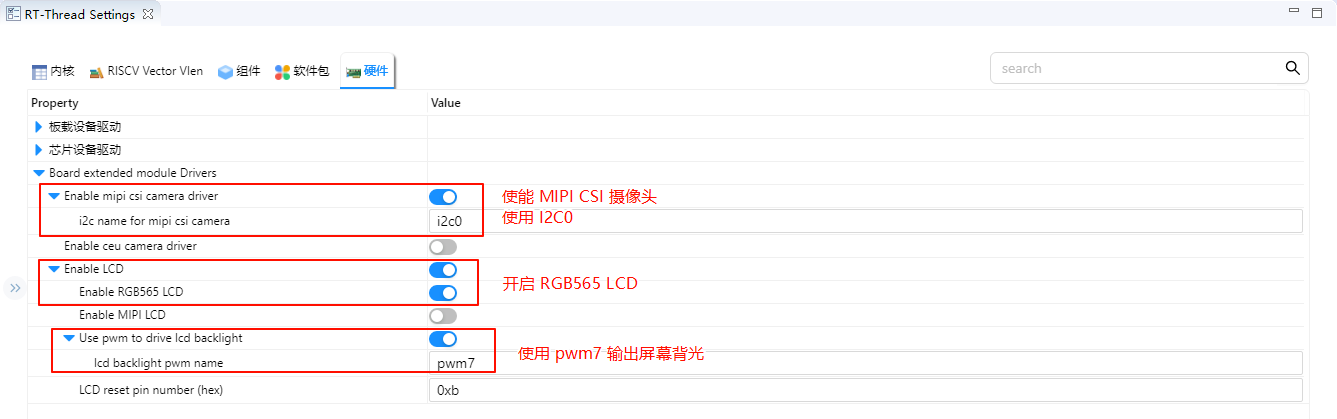
  • Enable MIPI CSI camera using i2c0; enable RGB565 LCD using pwm7 for backlight output.

image-20250815175755240

Compilation & Download

  • RT-Thread Studio: In RT-Thread Studio’s package manager, download the Titan Board resource package, create a new project, and compile it.

After compilation, connect the development board’s USB-DBG interface to the PC and download the firmware to the development board.

Run Effect

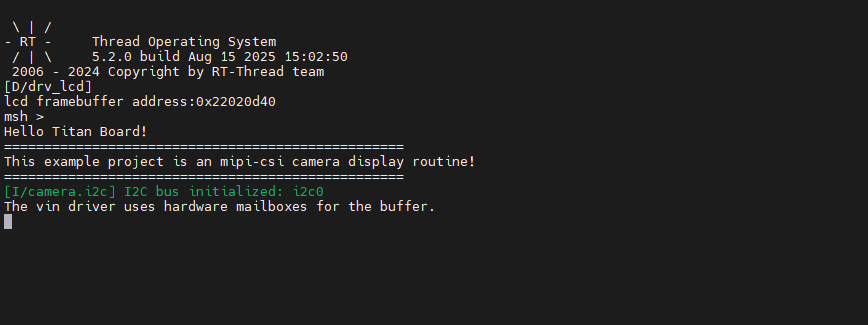
After resetting the Titan Board, the terminal will output the following message:

image-20250815150357776

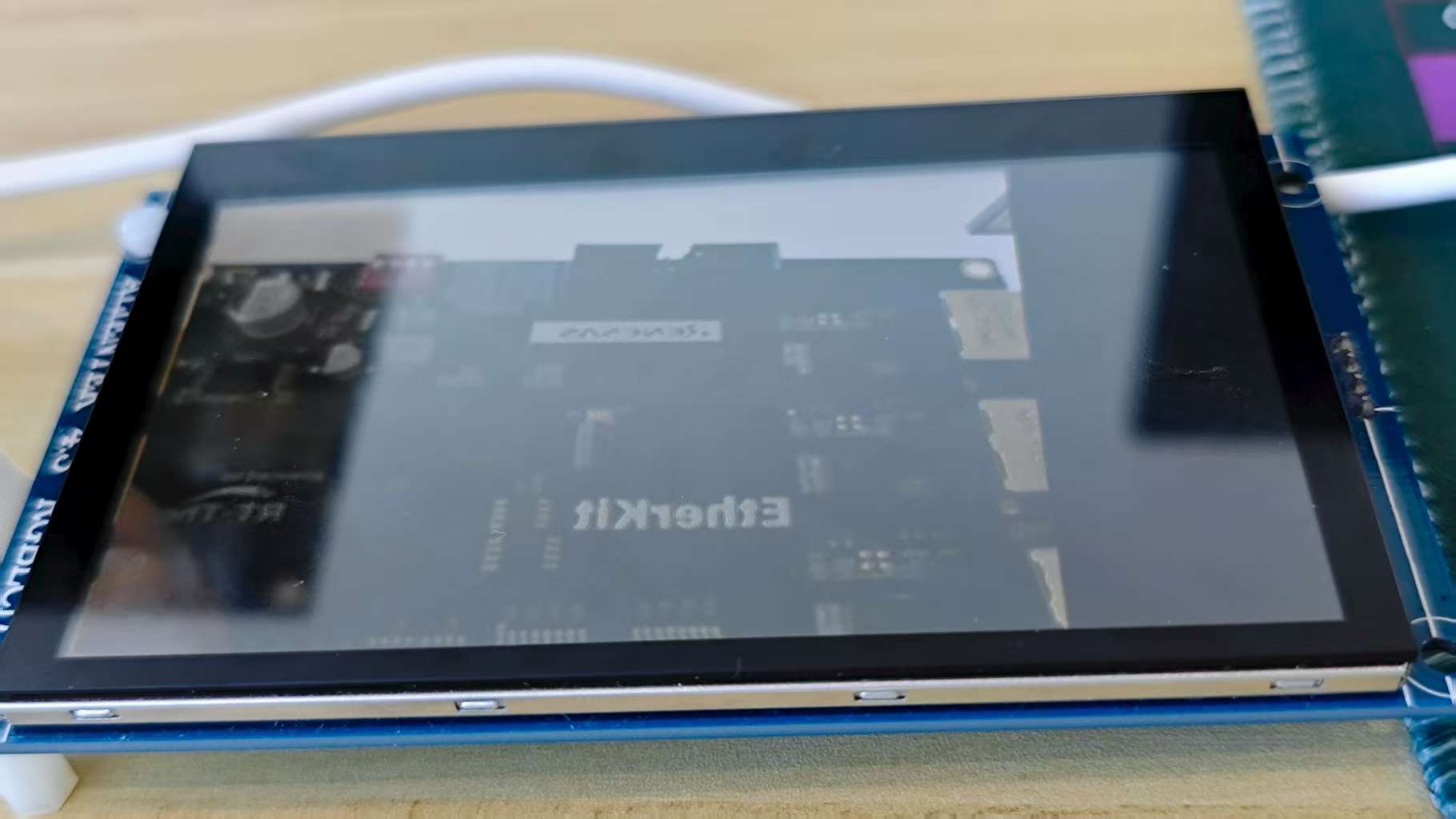
Here is the image displayed on the LCD screen:

image-20250815172223282