Edgi_Talk_Extend_Screen CherryUSB USB Extend Screen Example
中文 | English
Overview
This project integrates CherryUSB on the M55 core of the Edgi-Talk board. It is prepared for USB device mode, uses the Infineon DWC2 IP, and implements a Windows USB extend screen.
Default Configuration
RT_USING_CHERRYUSB = yRT_CHERRYUSB_DEVICE = yRT_CHERRYUSB_DEVICE_SPEED_HS = yRT_CHERRYUSB_DEVICE_DWC2_INFINEON = yDevice template: none (user application)
Display transport: vendor interface with RGB565 frames
Build and Flash
Build the project in RT-Thread Studio or with SCons.
Flash the firmware via KitProg3 (DAP).
Connect the Type-C USB port for device enumeration.
Configuration (Switching Modes)
Open RT-Thread Studio and go to:
RT-Thread Settings -> USB -> CherryUSB
Device mode: enable
RT_CHERRYUSB_DEVICE, select device IP under CHERRYUSB_DEVICE_IP (default:RT_CHERRYUSB_DEVICE_DWC2_INFINEON).Device classes: enable class drivers and select a template under Select usb device template.
If an IP/class requires extra parameters, edit:
libraries/Common/board/ports/usb/usb_config.h
Windows IDD Driver
Windows Indirect Display Driver (IDD) provides a user-mode driver model for monitors that are not connected to a traditional GPU output.
Reference: https://learn.microsoft.com/windows-hardware/drivers/display/indirect-display-driver-model-overview
This driver is based on: https://github.com/chuanjinpang/win10_idd_xfz1986_usb_graphic_driver_display
If you need to modify it, download and rebuild it yourself.
How to use
Install
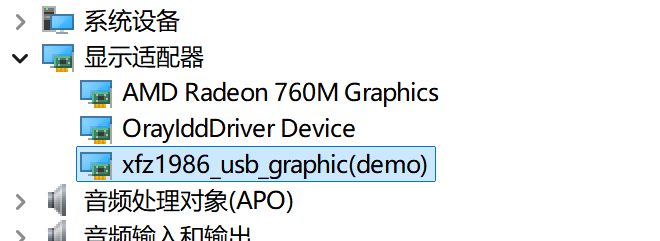
resources\USB_Graphic\xfz1986_usb_graphic_250224_rc_sign.exe.After installation, a new display appears under Display adapters.
Notes
The driver communicates via a vendor interface, supports multiple resolutions and formats, and is controlled by string descriptors. See: https://github.com/chuanjinpang/win10_idd_xfz1986_usb_graphic_driver_display/blob/main/README.md
The driver supports Windows 10 and Windows 11 only.
Startup Sequence
The M55 core depends on the M33 boot flow. Flash in this order:
+------------------+
|   Secure M33     |
|  (Secure Core)   |
+------------------+
          |
          v
+------------------+
|       M33        |
| (Non-Secure Core)|
+------------------+
          |
          v
+-------------------+
|       M55         |
| (Application Core)|
+-------------------+
Notes
⚠️ Note: This project requires RT-Thread Studio 2.2.9 or higher.
This project targets the M55 core in USB device mode.
For USB role switching on M55, see projects/Edgi_Talk_CherryUSB/Edgi_Talk_M55_USB_RoleSwitch/README.md.
For USB role switching on M33, see projects/Edgi_Talk_CherryUSB/Edgi_Talk_M33_USB_RoleSwitch/README.md.
If the M55 example does not run, flash Edgi_Talk_M33_Template first.
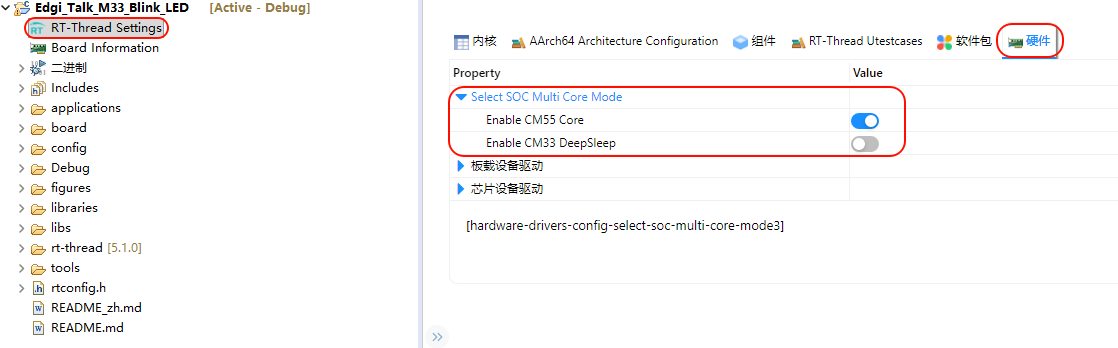
Enable CM55 in the M33 project:
RT-Thread Settings -> Hardware -> select SOC Multi Core Mode -> Enable CM55 Core