Edgi_Talk_M33_Template Example Project
中文 | English
Introduction
This template project is based on the Edgi-Talk platform and runs a minimal RT-Thread application on the Cortex-M33 core. It is intended to initialize the board, boot the Cortex-M55 core, and then stay idle with all optional peripheral demos disabled.
The shared Secure M33 firmware package lives under libraries/components/infineon-pse84-secure-firmware-latest, while keeping the Template .config minimal.
Software Description
The project is developed based on the Edgi-Talk platform.
SOC_Enable_CM55is enabled so board initialization starts the M55 core.AHT20, LSM6DS3, audio, ADC, RTC, SD card, filesystem, LCD, Wi-Fi, and other optional peripheral demos are disabled.
External Wi-Fi/audio power control pins are driven low during board initialization.
Usage Instructions
Compilation and Download
Open the project and complete the compilation.
Connect the board’s USB port to the PC using the onboard debugger (DAP).
Use the programming tool to flash the generated firmware to the development board.
Runtime Behavior
After flashing, power on the board to run the example project.
M33 initializes RT-Thread, starts M55, prints a short boot message, and then stays idle.
The template does not blink LEDs or start peripheral demos automatically.
Notes
⚠️ Note: This project requires RT-Thread Studio 2.2.9 or higher.
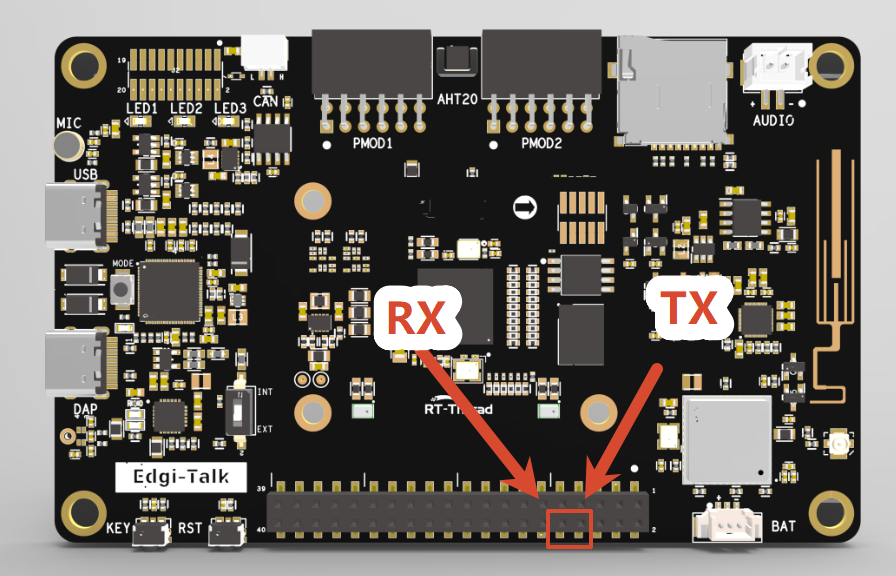
The M33 project serial log is not output through the onboard DAP virtual COM port directly. To view
msh />and demo logs, connect an external USB-to-UART adapter, such as CH340. The connection position is shown below. Connect the board RX to the UART adapter TX, connect the board TX to the UART adapter RX, and set the host serial baud rate to 115200:
To modify the graphical configuration of the project, open the configuration file using the following tool:
tools/device-configurator/device-configurator.exe
libs/TARGET_APP_KIT_PSE84_EVAL_EPC2/config/design.modus
After modification, save the configuration and regenerate the code.
To run an M55 project, it is recommended to flash Edgi_Talk_M33_Template first. It is a clean M33 project and is suitable as the base firmware before starting M55.
Boot Sequence
The system boot sequence is as follows:
+------------------+
|   Secure M33     |
|   (Secure Core)  |
+------------------+
          |
          v
+------------------+
|       M33        |
| (Non-Secure Core)|
+------------------+
          |
          v
+-------------------+
|       M55         |
| (Application Core)|
+-------------------+
⚠️ Please strictly follow the boot sequence above when flashing firmware; otherwise, the system may not run properly.
If the example project does not run correctly, compile and flash the Edgi_Talk_M33_Template project first to ensure proper initialization and core startup before running this example.
To enable the M55 core, configure the M33 project as follows:
RT-Thread Settings --> Hardware --> select SOC Multi Core Mode --> Enable CM55 Core