Edgi_Talk_M55_USB_H CherryUSB Example Project
中文 | English
Overview
This project integrates CherryUSB on the M55 core of the Edgi-Talk board. It is configured for USB host mode and uses the Infineon DWC2 IP.
Default Configuration
RT_USING_CHERRYUSB = yRT_CHERRYUSB_HOST = yRT_CHERRYUSB_HOST_MSC = yRT_CHERRYUSB_HOST_DWC2_INFINEON = yHost class drivers: MSC, CDC, HID (configurable)
Build and Flash
Build the project in RT-Thread Studio or with SCons.
Flash the firmware via KitProg3 (DAP).
Connect USB devices to the Type-C USB port for host operation.
Configuration (Switching Modes)
Open RT-Thread Studio and go to:
RT-Thread Settings -> USB -> CherryUSB
Host mode: enable
RT_CHERRYUSB_HOST, select host IP under CHERRYUSB_HOST_IP (default:RT_CHERRYUSB_HOST_DWC2_INFINEON).Host classes: enable required class drivers (MSC for USB storage, HID for keyboards/mice, CDC for serial devices, etc.).
Device mode: disable host mode, enable
RT_CHERRYUSB_DEVICE, and select device template.
If an IP/class requires extra parameters, edit:
libraries/Common/board/ports/usb/usb_config.h
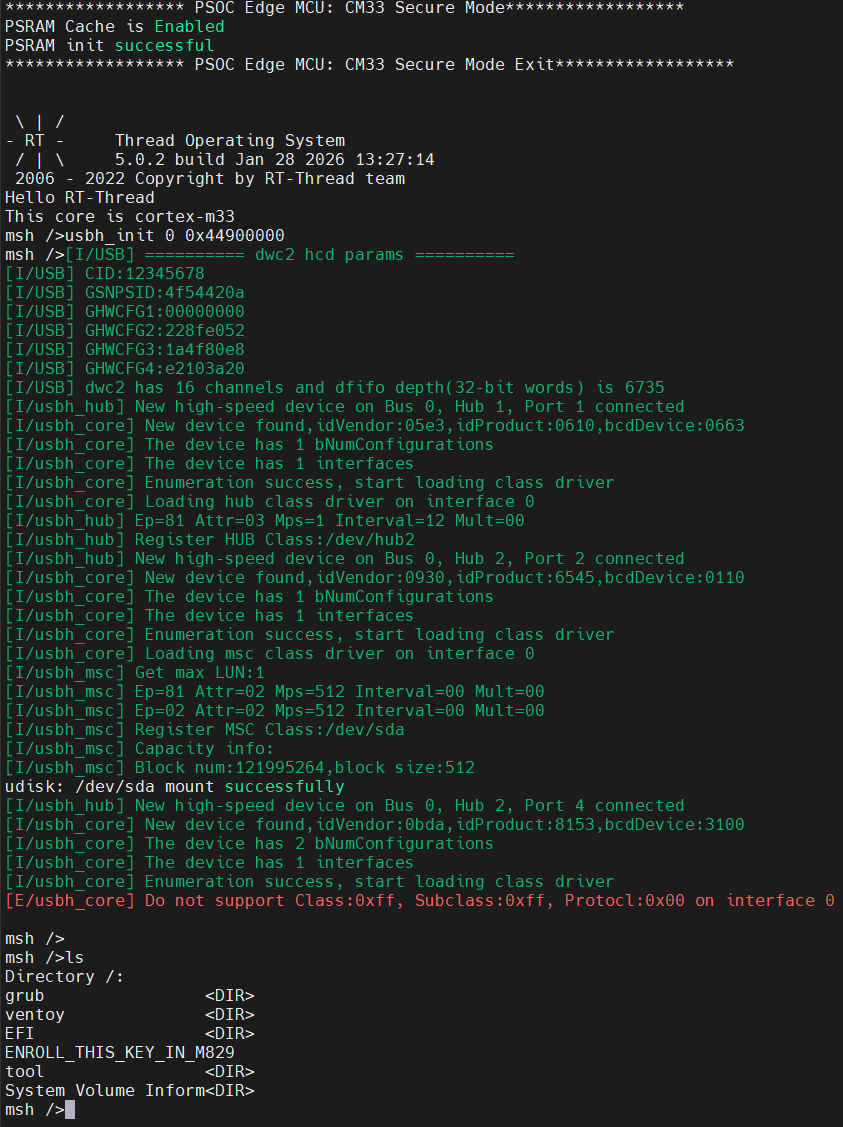
USB U-Disk (Host) Result
Notes
⚠️ Note: This project requires RT-Thread Studio 2.2.9 or higher.
This project targets the M55 core in USB host mode.
For device mode, see projects/Edgi_Talk_CherryUSB/Edgi_Talk_M55_USB_D/README.md.
For M33 host mode, see projects/Edgi_Talk_CherryUSB/Edgi_Talk_M33_USB_H/README.md.
Startup Sequence
The M55 core depends on the M33 boot flow. Flash in this order:
+------------------+
|   Secure M33     |
|  (Secure Core)   |
+------------------+
          |
          v
+------------------+
|       M33        |
| (Non-Secure Core)|
+------------------+
          |
          v
+-------------------+
|       M55         |
| (Application Core)|
+-------------------+
Notes
⚠️ Note: This project requires RT-Thread Studio 2.2.9 or higher.
If the M55 example does not run, flash Edgi_Talk_M33_Blink_LED first.
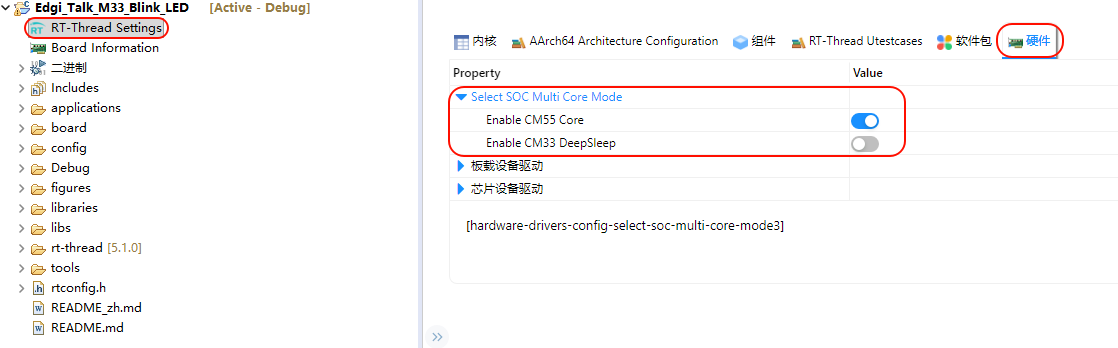
Enable CM55 in the M33 project:
RT-Thread Settings -> Hardware -> select SOC Multi Core Mode -> Enable CM55 Core