明白了,以下是更新为你指定格式的英文版本👇
Edgi-Talk_M55_CoreMark Example Project
中文 | English
Introduction
This example project is based on the Edgi-Talk platform, demonstrating the CoreMark benchmark running on the M55 core under the RT-Thread real-time operating system. Through this project, users can quickly verify the performance of the M55 core and understand how the multi-core coprocessor operates under a real-time OS environment.
About CoreMark
CoreMark is a standardized embedded CPU benchmark developed by EEMBC (Embedded Microprocessor Benchmark Consortium). It is primarily used to measure the core computational performance of a microcontroller or processor, independent of specific hardware peripherals.
Test Contents
CoreMark evaluates CPU performance through four representative algorithm categories:
List processing
Matrix operations
State machine
CRC (Cyclic Redundancy Check)
Test Results
The output is represented as CoreMark/MHz or CoreMark, which allows performance comparison between different processors or compiler optimization levels.
Features
Open source, portable, and lightweight
Repeatable and verifiable results
Focused on CPU integer computation capability
Software Description
The project is developed based on the Edgi-Talk platform.
The example includes:
Running CoreMark benchmark on the M55 core
Printing benchmark results through UART
The project has a clean structure, making it easy to understand the M55 startup process and performance testing method.
Usage
n> ⚠️ Note: This project requires RT-Thread Studio 2.2.9 or higher.
Build and Download
Open the project and compile it.
Connect the board’s USB interface to your PC using the onboard debugger (DAP).
Use the programming tool to flash the generated firmware to the development board.
Running Result
After flashing, power on the board to start RT-Thread.
The following serial output indicates the system started successfully:
 \ | /
- RT -     Thread Operating System
 / | \     5.0.2 build Sep  5 2025 15:19:27
 2006 - 2022 Copyright by RT-Thread team
msh >Hello RT-Thread
It's cortex-m55
Then, manually enter the following command in the serial terminal:
core_mark
The system will start the CoreMark test and print the benchmark results, for example:
Benchmark started, please make sure it runs for at least 10s.

2K performance run parameters for coremark.
CoreMark Size    : 666
Total ticks      : 30218
Total time (secs): 30
Iterations/Sec   : 1200
Iterations       : 36000
Compiler version : GCC10.2.1 20201103 (release)
Compiler flags   :
Memory location  : STACK
seedcrc          : 0xe9f5
[0]crclist       : 0xe714
[0]crcmatrix     : 0x1fd7
[0]crcstate      : 0x8e3a
[0]crcfinal      : 0xcc42
Correct operation validated. See README.md for run and reporting rules.
CoreMark 1.0 : 1200 / GCC10.2.1 20201103 (release)  / STACK
Notes
⚠️ Note: This project requires RT-Thread Studio 2.2.9 or higher.
To modify the graphical configuration of the project, open the configuration file using the following tool:
tools/device-configurator/device-configurator.exe
libs/TARGET_APP_KIT_PSE84_EVAL_EPC2/config/design.modus
After modification, save the configuration and regenerate the code.
Startup Sequence
The system starts in the following order:
+------------------+
|   Secure M33     |
|  (Secure Core)   |
+------------------+
          |
          v
+------------------+
|       M33        |
| (Non-Secure Core)|
+------------------+
          |
          v
+-------------------+
|       M55         |
| (Application Core)|
+-------------------+
⚠️ Please strictly follow the above flashing sequence; otherwise, the system may fail to run properly.
If the example does not run correctly, first compile and flash the Edgi_Talk_M33_Blink_LED project to ensure proper initialization and core startup, then run this example.
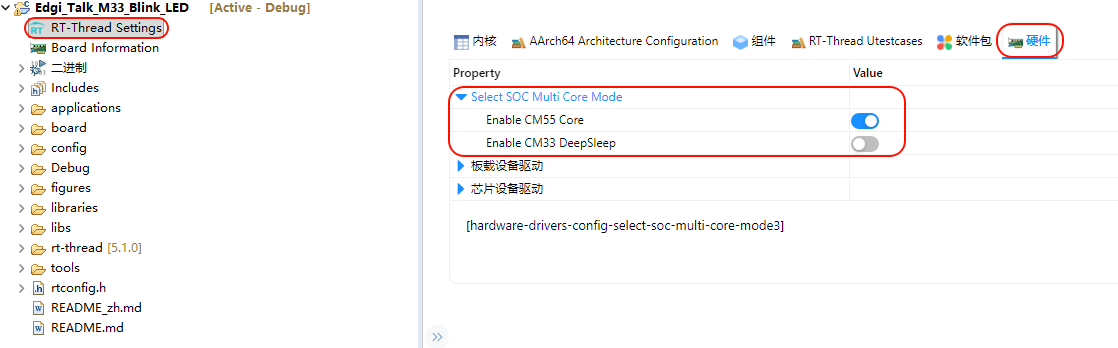
To enable the M55 core, enable the following configuration in the M33 project:
RT-Thread Settings --> Hardware --> select SOC Multi Core Mode --> Enable CM55 Core