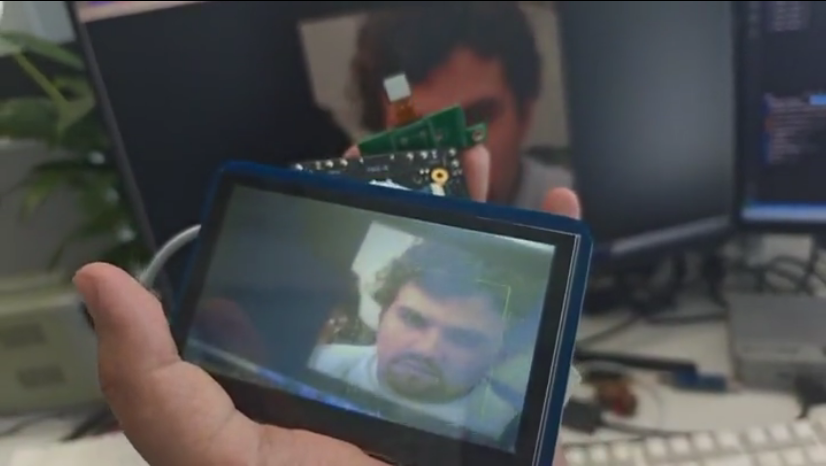
MIPI NPU Face Detection
English | 中文
Overview
This example runs real-time face detection on Titan Board Mini using:
OV5640 camera connected through MIPI CSI
RA8P1 VIN for frame capture
Arm Ethos-U55 NPU for YOLO-Fastest inference
RGB565 LCD for live preview and face box overlay
Features
Captures camera frames from MIPI CSI + VIN
Runs YOLO-Fastest face detection on the NPU
Draws green face boxes on the LCD
Supports OV5640 auto focus by user key
Supports compile-time control for detection logs
Data Flow
OV5640
  -> MIPI CSI
  -> VIN frame buffer
  -> CPU preprocessing (resize + grayscale + quantization)
  -> Ethos-U55 inference
  -> CPU postprocessing (decode + NMS)
  -> D/AVE2D overlay
  -> GLCDC
  -> RGB565 LCD
Model
Model: YOLO-Fastest (face detection)
Framework: TensorFlow Lite INT8
Input size: 192 x 192
Camera frame size: 640 x 480
Runtime Controls
Auto focus
Press the user key to trigger OV5640 auto focus.
Detection log switch
Edit
DETECT_RESULT_LOG_ENABLEinsrc/hal_entry.c0: disabledetect box num/Time elapsedlogs1: enable logs
Important Notes
The project uses the framebuffer overlay path for face box rendering on the LCD.
OV5640 is configured through I2C0 in the MIPI camera path.
RT-Thread / FSP Configuration
Make sure the project enables:
MIPI CSI
VIN
Ethos-U55 / rm_ethosu
OV5640 control through I2C0
RGB565 LCD / GLCDC
Build and Flash
Build the project with RT-Thread Studio or the existing project build flow in this repository, then flash it through the board debug interface.
Expected Result
After boot:
The LCD shows the live OV5640 preview
Detected faces are highlighted with green rectangles
Pressing the user key triggers camera auto focus